Tuesday, May 25, 2010
Free Wordpress Templates
 6:04 AM |
  Posted by
dang
Posted by
dang
There are loads of free wordpress templates available on the net. So why wouldn't I drop a few extra ones into the bag?:)
From now you can have an access to my new page where I store free wordpress themes available for instant download. I've just come up with a few for good start off and will be adding new ones frequently.
So feel free to visit this link, download the theme of your choice or all of them at once to make your blog more oudstanding than ever before.
From now you can have an access to my new page where I store free wordpress themes available for instant download. I've just come up with a few for good start off and will be adding new ones frequently.
So feel free to visit this link, download the theme of your choice or all of them at once to make your blog more oudstanding than ever before.
 Labels:

Thursday, May 20, 2010
Mixing 2D and 3D Graphics
Some designers stick to one specific graphic program working with it's limitations and when it comes to create something more advanced like a 3d looking image in 2d graphic application, they bite nails wondering how to make it.
The solution is mixing capabilities of a few programs. We have so many great 2d and 3d graphic
applications so why not to get the most from each of them and drop on one project?
Mixing 2d and 3d graphics can bring really outstanding effects to your artwork that will make viewers feelamazed and wondering how the image was done.
The nature of 3d programs is their ability to render realistic looking 3d scenes along
with lights and natural shadows.
2d programs like Photoshop for example are great for adjusting colors and giving final touches
to the still images in order to increase their visual appearance.
You can take the capabilities of both to your advantage.
Just use your favorite 3d graphic software and render a simple scene with a few lights
and shadows to the still image format. Open it in 2d graphic program and drop for instance a cut silhouette of yourself on the background. A Few color adjustments and you get ready to go with the image.
Using 2d graphic programs you can easily add fast and nicely looking effects to the 3d renderings such as:
textures, color changes, contrast or additional lighting that could take hours to get rendered in 3d application.
Summarizing 2d and 3d graphic applications can be powerful weapon in hands of designer. When capabilities of both are mixed the right way, the results may be amazing and imagination only a limit.
Example:
Open your favorite 3D graphic application.
In my case that's Blender a free and powerful 3D graphic program.
I added an extruded text using a text tool and extrude object tool.
This way I got a nice and simple 3D text object dropped on a plane (which serves as a floor).

Now it's time to render the picture.
If you're not happy with results you can always rearrange objects on the scene the way you want and ajdust the light to fit it better.
It takes some testing before getting good results.

I opened the rendered scene and photograph in Photoshop. Next I cut silhouette off the background of the photograph using polygonal lasso tool.
I pasted silhouette onto the rendered background and adjusted it's position.

Now it's time for a brush play:)
I created new layer and set the blending mode to OVERLAY and painted some colors overlayed on the numbers using simple brush.

After all I erased excessive parts of the color. Next I painted cracks using crack brushes set to give to the numbers an old stone feel.
Final touches like contrast increase a few more brushes here and there, erasing some parts of brushed colors along the edges in unwanted areas and design comes up like this:

Have a fun mixing 2D and 3D :)
The solution is mixing capabilities of a few programs. We have so many great 2d and 3d graphic
applications so why not to get the most from each of them and drop on one project?
Mixing 2d and 3d graphics can bring really outstanding effects to your artwork that will make viewers feelamazed and wondering how the image was done.
The nature of 3d programs is their ability to render realistic looking 3d scenes along
with lights and natural shadows.
2d programs like Photoshop for example are great for adjusting colors and giving final touches
to the still images in order to increase their visual appearance.
You can take the capabilities of both to your advantage.
Just use your favorite 3d graphic software and render a simple scene with a few lights
and shadows to the still image format. Open it in 2d graphic program and drop for instance a cut silhouette of yourself on the background. A Few color adjustments and you get ready to go with the image.
Using 2d graphic programs you can easily add fast and nicely looking effects to the 3d renderings such as:
textures, color changes, contrast or additional lighting that could take hours to get rendered in 3d application.
Summarizing 2d and 3d graphic applications can be powerful weapon in hands of designer. When capabilities of both are mixed the right way, the results may be amazing and imagination only a limit.
Example:
Open your favorite 3D graphic application.
In my case that's Blender a free and powerful 3D graphic program.
I added an extruded text using a text tool and extrude object tool.
This way I got a nice and simple 3D text object dropped on a plane (which serves as a floor).

Now it's time to render the picture.
If you're not happy with results you can always rearrange objects on the scene the way you want and ajdust the light to fit it better.
It takes some testing before getting good results.

I opened the rendered scene and photograph in Photoshop. Next I cut silhouette off the background of the photograph using polygonal lasso tool.
I pasted silhouette onto the rendered background and adjusted it's position.

Now it's time for a brush play:)
I created new layer and set the blending mode to OVERLAY and painted some colors overlayed on the numbers using simple brush.

After all I erased excessive parts of the color. Next I painted cracks using crack brushes set to give to the numbers an old stone feel.
Final touches like contrast increase a few more brushes here and there, erasing some parts of brushed colors along the edges in unwanted areas and design comes up like this:

Have a fun mixing 2D and 3D :)
Thursday, May 6, 2010
Cheap Wordpress Themes For Sale

I do love Blogger as much as Wordpress. Nonetheless these are quite opposite blogging platforms they both serve quality, functionality and ease of blogging.
However to make the most out of blogging and impress your readers, having custom designed layout is a must.
Recently I had an opportunity to design a few Wordpress Themes For Sale.
My original designs of the wordpress themes will surely satisfy every blogger and will replace his boring default theme with something fresh and eye catching.
No matter whether you blog for hobby or for business having your own custom wordpress theme is an important factor to stay unique and attract more readers.
Tuesday, May 4, 2010
Freelance T-shirt Designer

As we have warm spring already people tend to wear short sleeve top wear.
This is the best time to put on fancy t-shirts with cool designs.
When it comes to t-shirt designs, there are many shops offering custom tees with original and stylish pictures on them.
Where do they get such nice designs from?
Well the answer is simple. Most of businesses hire freelance t-shirt designers to get cool, and original design concepts.
Freelance t-shirt designer with experience in clothing industry knows how to make design outstanding, catchy and easy for t-shirt printing.
Designer is able to make signature designs for particular company using various techniques and styles he worked out through the years.
If you are a person who is entering into clothing business and you want to stand out of the crowd with custom, original and beautifully desinged images on your clothes, then hiring a good freelance t-shirt designer is your first and most important step to get noticed.
Getting design on your t-shirts that customers will enjoy is significant factor to build powerfull, recognizable and profitable clothing brand.
Tuesday, April 27, 2010
Photoshop vs Illustrator
Photoshop vs Illustrator.
Adobe package is one of the most awesome complete graphic packages on the planet:)
The Illustrator and Photoshop are usually most often used and most popular
programs from Adobe house:)
And here comes the question that bothers many new designers taking their first steps into these programs.
What is the difference between Adobe Photoshop and Illustrator?
Well before we answer this question, let's have a look at one important fact.
Many designers tend to use PHOTOSHOP for almost everything. This is a program that has capability to actually create every single form of 2 dimensional graphic.
That's why many designers love Photoshop so much that they use it for everything, beginning from photo-retouch to web design, illustration, logotypes and anything else you can imagine.
They are so much in love with Photoshop that they forget about his little brother Illustrator who is much greater and helpful in some particular graphic areas.
So when you are about to choose which of those to pick for creating the project, bear in mind that Photoshop works mainly with pixels, which means that layers when resized loose their quality.
Illutrator works with vectors that allow you to resize vectorized layers freely without loosing quality.
What it means is that Illustrator can make from little tiny low quality picture a nice vectorized large size project.
Also Illustrator is better for creating logotypes and vector drawings commonly used for clothing, poster or flyers printing in thanks to text manipulations and preset styles and vector effects number which is greater than in Photoshop.
In addition the fact that layered objects can be resized without loosing quality allows you further and safer modifications of the project.
On the other hand Photoshop has better capability to blend colors together in order to make projects look more realistic.
To make long story short Photoshop is better for:
-photo retouch
-photo manipulation
-digital paintings
-photorealistic illustrations
-web design
-poster designs involving photo manipulation
-special effects
-projects not requiring size's increase in the future.
Illustrator is better for:
-logo design
-cartoon illustrations
-resizable vector drawings
-vector tracing
-resizable images of objects
-clothing design
-transforming low quality bitmap pictures into
high quality and large vector images.
-working with text
This is my opinion that comes out of my own experience. If you feel different way, feel free:)
Anyway knowing both of these programs is a great benefit that will allow you to create any kind of graphic without struggle.
Adobe package is one of the most awesome complete graphic packages on the planet:)
The Illustrator and Photoshop are usually most often used and most popular
programs from Adobe house:)
And here comes the question that bothers many new designers taking their first steps into these programs.
What is the difference between Adobe Photoshop and Illustrator?
Well before we answer this question, let's have a look at one important fact.
Many designers tend to use PHOTOSHOP for almost everything. This is a program that has capability to actually create every single form of 2 dimensional graphic.
That's why many designers love Photoshop so much that they use it for everything, beginning from photo-retouch to web design, illustration, logotypes and anything else you can imagine.
They are so much in love with Photoshop that they forget about his little brother Illustrator who is much greater and helpful in some particular graphic areas.
So when you are about to choose which of those to pick for creating the project, bear in mind that Photoshop works mainly with pixels, which means that layers when resized loose their quality.
Illutrator works with vectors that allow you to resize vectorized layers freely without loosing quality.
What it means is that Illustrator can make from little tiny low quality picture a nice vectorized large size project.
Also Illustrator is better for creating logotypes and vector drawings commonly used for clothing, poster or flyers printing in thanks to text manipulations and preset styles and vector effects number which is greater than in Photoshop.
In addition the fact that layered objects can be resized without loosing quality allows you further and safer modifications of the project.
On the other hand Photoshop has better capability to blend colors together in order to make projects look more realistic.
To make long story short Photoshop is better for:
-photo retouch
-photo manipulation
-digital paintings
-photorealistic illustrations
-web design
-poster designs involving photo manipulation
-special effects
-projects not requiring size's increase in the future.
Illustrator is better for:
-logo design
-cartoon illustrations
-resizable vector drawings
-vector tracing
-resizable images of objects
-clothing design
-transforming low quality bitmap pictures into
high quality and large vector images.
-working with text
This is my opinion that comes out of my own experience. If you feel different way, feel free:)
Anyway knowing both of these programs is a great benefit that will allow you to create any kind of graphic without struggle.
Monday, April 26, 2010
Graphic Designer for Hire

There are loads of graphic designers specializing in various computer graphic areas.
Many of them are associated with large design companies, while others prefer to work freelance for various clients.
Usually designers are wide open for new challenges when it comes to create good looking arts and designs.
So when should you start looking for graphic designer for hire?
Well you might be a person who needs some little nice looking project which you want to be unique and different than anything else around. Maybe you are a person who is busy running a business not having time to manage visual side of it by yourself and needs for instance advanced design of website or advertising material.
No matter which of the above persons you are, you definitely should hire graphic designer.
By letting him do the work for you, you make sure that the project will be professional and you will save a lot of time which you can spend on other activities.
When it comes to hire artist or graphic designer, you should look for one who represents particular skills in the computer graphic category which your expected design falls into.
The easiest way to do it is to browse portfolios of different artists in order to compare their work and style with your own expectations. Then select a few ones in order to further narrow results to only one designer whose portfolio suits you best.
The pricing might be different. While one designer will charge per project another one will set the rate per hour. Both pricing methods are good as amount of time and effort that designer puts into project should be much respected. Professional graphic design isn't an area where you should battle for big price downcuts if you are looking for quality.
Respect all the above, appreciate the talent and hard work of designer and you will find the one who will beauty up your business.

Tuesday, April 13, 2010
Digital Arts
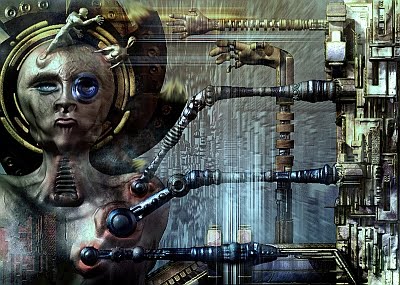
In result my gallery gets updated frequently with new digital arts and designs.
This is the crucial factor for every single graphic designer. If you are good, remember that you can be even better by improving design skills you've not mastered yet.

I'm still working out the way to freely move between various graphic design styles. The learning process never ends and new skills to gain are out there:)


Subscribe to:
Posts (Atom)